
No subtitles?
Enjoy anime and movies.
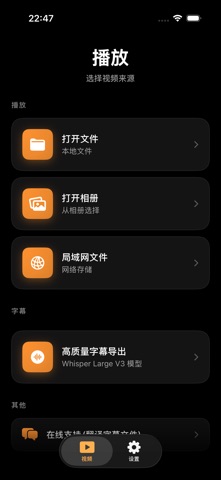
Open your anime or movie from local files, Photos or a NAS in SubtitleVideo. Watch with original subtitles and translation, or quickly create a complete subtitle file on-device. No account or video upload to our servers required.
FAST GENERATION. SUBTITLES FOR THE WHOLE VIDEO.
2 hours of videoabout 1 minute
iPhone 16 Pro · iOS 26 · including subtitle translation
Developer-provided example; times vary with device, language and video. Long files require Pro.
Includes 30 cumulative live minutes and 3 complete generations, up to 30 minutes per file.
From your next anime episode to movie night
Follow anime, watch original-language movies and add subtitles to the videos in your personal NAS library.
Follow the dialogue as you watch
Open your anime episode with original subtitles and translation during playback. No need to generate the entire episode's subtitles first.
Read the guide 02 / MOVIESGet the whole movie's subtitles ready
Quickly create separate original and translated SRT files for the whole movie. Keep them for later viewing in a player that supports SRT.
Read the guide 03 / YOUR PERSONAL NAS LIBRARYGive your own collection subtitles
Open anime and movies from your NAS over SMB. Generate complete subtitles on-device and save them back to the video folder with write permission.
Read the guideYour personal video library stays in your control
- Complete generation stays on-device
- Your anime and movies do not need to be uploaded to our servers. Generate complete subtitles on-device and save them to your chosen folder or NAS.
- No account required
- No name or email is needed to register for subtitle features. Install, choose your video and prepare any requested models or language packs to get started.
Live recognition on earlier OS versions may use Apple's online service. Model preparation and NAS access can also require a connection.
Try a clip from your anime or movie first
No registration needed. Try two separate, cumulative allowances before upgrading. They do not reset daily, weekly or monthly; recognition and translation depend on device, OS and language.
- Free live subtitles
- 30 cumulative minutes to try subtitles and translation as you watch
- Free complete generation
- 3 successful generations, up to 30 minutes per video
- Your video sources
- Local files, Photos and NAS videos over SMB
- Devices
- iPhone and iPad · iOS 18 or later
Check the subtitle file, too
Check SRT timing, cue numbers and structure for free, or download sample files. Files stay in your browser; no login required.
A few questions, answered
What is SubtitleVideo?
SubtitleVideo is an iPhone subtitle and translation app focused on anime, movies and personal NAS video libraries. No registration is required. It offers live subtitles and translation, complete on-device generation for local and NAS videos, and separate original and translated SRT exports.
Read the guideDo I need an account or have to upload my video?
No account or video upload to our servers is required. Complete subtitle generation runs on-device; live recognition on earlier OS versions may use Apple's online service. Model preparation, NAS access and purchases can still need a connection. See the privacy policy and offline guide.
Read the guideWhen can a two-hour video take about one minute?
This is a developer-provided example on iPhone 16 Pro with iOS 26, including subtitle translation. Actual times vary with device, language and audio; NAS sources also depend on network speed. The free per-file limit is 30 minutes, so a two-hour file requires Pro.
Read the guideWhich OS is required?
The iPhone and iPad version requires iOS 18 or later. Recognition and translation availability also depend on the device, OS, language and prepared models.
Read the guideEnjoy your next anime or movie with subtitles
Open your own anime or movie with no account required. Try live subtitles and translation with the free allowance, then generate complete subtitles when you need them.
Checked against current app functionality. Availability can vary with the OS, language and store region. App Store · Product identity & support